
The landscape of the publishing industry has undergone a seismic shift over the last decade. Gone are the days when an aspiring author’s only path to success was through the "gatekeepers" of traditional publishing houses. Today, Amazon Kindle Direct Publishing (KDP) has democratized the world of literature, allowing anyone with a story, a tutorial, or a niche insight to reach a global audience of millions. However, as the platform has grown, so has the competition. Simply uploading a manuscript is no longer enough to guarantee visibility or sales.
To succeed on Amazon KDP in the current market, authors must think like entrepreneurs. They must understand the nuances of the Amazon A9 algorithm, the psychology of book cover design, and the technicalities of royalty structures. This comprehensive guide serves as an authoritative roadmap for both new authors looking to launch their first title and experienced publishers aiming to scale their portfolios. We will move beyond the basics and dive into the advanced strategies that separate high-earning authors from the hobbyists.
What is Amazon KDP? Understanding the Ecosystem
Amazon Kindle Direct Publishing is a Print-on-Demand (POD) and digital distribution platform. At its core, it allows authors to upload their work and make it available in eBook, paperback, and hardcover formats. The "Print-on-Demand" aspect is particularly revolutionary for independent authors; it means Amazon only prints a physical copy of your book when a customer actually buys it. This eliminates the need for authors to invest thousands of dollars in inventory or manage warehouse logistics.
However, the ecosystem is more complex than a simple upload portal. It is a data-driven marketplace. When you publish through KDP, you are feeding a search engine. Your title, subtitle, keywords, and categories are not just labels—they are data points that tell Amazon’s algorithm who your target reader is. In 2024, Amazon’s focus has shifted heavily toward customer experience, meaning that high-quality content, positive reviews, and low return rates are more critical than ever for maintaining your "Best Sellers Rank" (BSR).
The Difference Between eBooks and Print-on-Demand
While many authors focus primarily on Kindle eBooks, the paperback market remains a massive revenue stream. KDP Print allows for global distribution, meaning your physical book can be ordered by a reader in the UK, Germany, or Japan as easily as someone in the United States. Hardcover options have also become more widely available, providing a premium feel for non-fiction guides or special edition novels. Each format requires specific technical formatting—ranging from gutter margins to spine width calculations—which we will address in the technical sections of this guide.
Financial Logistics: Navigating Royalty Rates and Pricing Strategy
One of the most attractive features of Amazon KDP is the royalty structure, which is significantly more generous than traditional publishing contracts. However, these rates come with specific conditions that can impact your bottom line if not understood correctly.
The 70% vs. 35% Royalty Tiers
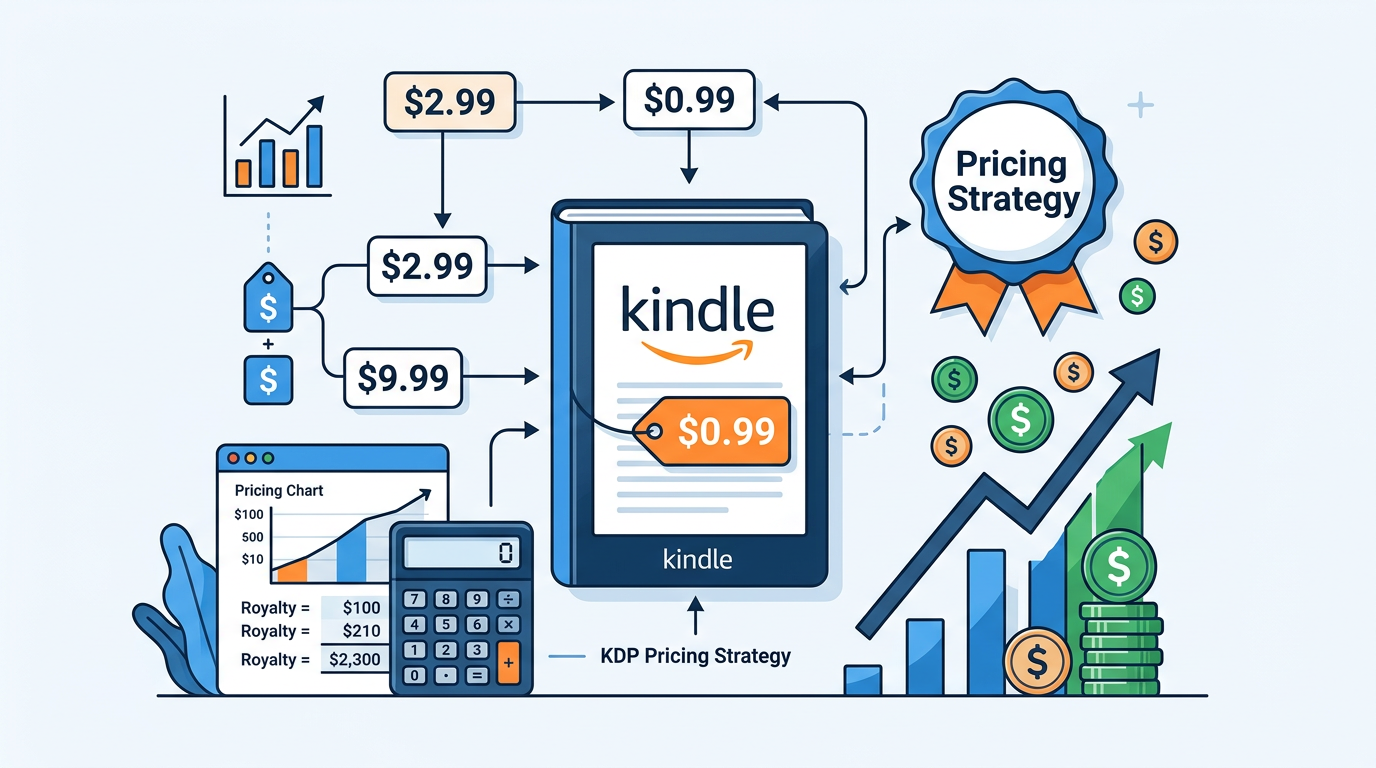
For eBooks, Amazon offers two primary royalty options: 35% and 70%. To qualify for the 70% royalty, your book must generally be priced between $2.99 and $9.99. If you price your book below $2.99 or above $9.99, your royalty drops to 35%.
There is a hidden cost in the 70% tier: Delivery Fees. Amazon charges a small fee based on the file size of your eBook (usually $0.15 per megabyte). If you have a graphic-heavy book, these fees can eat into your profit. For text-heavy novels, this is negligible. For those publishing massive technical manuals or photography books, the 35% tier (which has no delivery fee) might actually be more profitable. To see how these numbers play out for your specific project, use our Royalty Calculator to compare your potential earnings across different price points.
Paperback Printing Costs
Paperback royalties are calculated differently. You receive 60% of the list price, minus the printing costs. The printing cost depends on the page count, ink type (black and white vs. color), and the Amazon marketplace where the book is sold. It is a common mistake for new authors to price their physical books too low, resulting in a royalty of only a few cents per copy. Professional authors aim for a minimum of $2.00 to $4.00 profit per paperback to ensure they have enough margin to cover advertising costs.
Technical Mastery: Formatting and Cover Design
Quality is the primary filter for Google AdSense standards and, more importantly, for reader trust. A book that looks "self-published" in a negative sense will attract poor reviews, which kills your Amazon ranking. Professionalism starts with the technical assets.
The Psychology of Cover Design
Your cover has one job: to make the reader stop scrolling. It must signal the genre immediately. A thriller cover should look like a thriller; a self-help book should look authoritative and clean. Colors, fonts, and imagery must align with "Top 100" books in your specific niche. Furthermore, the technical specifications for print covers are strict. If your spine is off by a millimeter, your text will wrap around the edge. We recommend using our Cover Calculator to ensure your dimensions, bleed, and margins are mathematically perfect before you start the design process.
Interior Formatting and Readability
For eBooks, the "Reflowable" format is king. This allows readers to change font sizes and styles on their Kindle devices. For paperbacks, "Fixed Layout" is used to ensure that the PDF you upload looks exactly the same on the printed page. Pay close attention to:
- The Gutter: The inner margin that accounts for the book’s binding. Without a proper gutter, readers will have to break the spine to read the start of every sentence.
- Font Choice: Use serif fonts (like Garamond or Caslon) for the body text of print books, as they are easier on the eyes for long-form reading.
- Front Matter: Ensure you include a professional Title Page, Copyright Page, and Table of Contents.
Metadata Optimization: Keywords and Categories
Metadata is how Amazon’s search engine understands your book. Many authors treat this as an afterthought, but it is the foundation of your "organic" (free) traffic.
The 7 Backend Keywords
KDP gives you seven slots for keywords. Do not just put single words like "fiction" or "business." Use long-tail phrases that real customers type into the search bar, such as "beginner guide to keto diet 2024" or "clean small town romance series." Avoid repeating words that are already in your title or subtitle, as Amazon’s algorithm already indexes those. To find the most effective combinations of high-volume and low-competition search terms, utilize our Keyword Combiner to build a data-driven metadata strategy.
Strategic Category Selection
Amazon recently updated its category system. You can now select three specific categories directly in the KDP dashboard. The goal is to find a balance between "Highly Relevant" and "Competitive." Being #1 in a tiny, obscure category is often better than being #5,000 in a massive category like "Romance" or "Self-Help," as the #1 spot earns you a "Best Seller" badge, which significantly increases your conversion rate.
The Art of the Sales Page: Descriptions That Convert
Once a reader clicks on your cover, your book description must close the deal. Most authors write a boring summary. Successful authors write "Sales Copy."
Your description should use a "Hook, Problem, Solution, Call to Action" framework for non-fiction, or a "Hook, Character, Conflict, Stakes" framework for fiction. Use bold headings and bullet points to make the text skimmable. Amazon allows for basic HTML formatting in these descriptions, but it can be tricky to code manually. Using our HTML Description Formatter allows you to create professional-looking descriptions with bold text, lists, and headings that stand out from the plain-text descriptions used by your competitors.
"Your book description is not a summary; it is a sales page. Its goal is not to tell the story, but to sell the experience of reading the story."
The KDP Select Debate: To Be Exclusive or "Go Wide"?
One of the most critical decisions you will make is whether to enroll your eBook in KDP Select. This is a 90-day exclusivity agreement where you promise not to sell your eBook on any other platform (like Apple Books, Kobo, or Google Play). In exchange, Amazon gives you:
- Kindle Unlimited (KU) Inclusion: Readers who pay a monthly subscription can read your book for "free," and you get paid per page read (KENP - Kindle Edition Normalized Pages).
- Promotional Tools: Access to "Free Book Promotions" and "Kindle Countdown Deals."
- Higher Visibility: The KU ecosystem is massive, and for many genres (like Romance and Thrillers), it is the primary source of income.
The "Going Wide" Strategy: If you choose not to enroll in KDP Select, you can publish on all platforms. This is often better for long-term brand building and reaching international audiences who may not use Amazon as their primary retailer. Expert insight suggests that new authors often start in KDP Select to gain initial traction and then "go wide" once they have a dedicated fan base.
Expert Strategies for Marketing and Scaling
Publishing is only 20% of the work; marketing is the remaining 80%. In a crowded market, you need a multi-faceted approach.
Amazon Advertising (AMS)
Amazon’s internal advertising platform allows you to pay to show your book to readers who are looking at similar titles. This is a "Pay-Per-Click" (PPC) system. Success here requires careful monitoring of your ACOS (Advertising Cost of Sales). If your ACOS is lower than your royalty percentage, you are essentially printing money. If it is higher, you are losing money to gain visibility—a strategy sometimes used during a launch to "jumpstart" the algorithm.
Building an ARC Team
ARC stands for "Advanced Review Copy." Before your book launches, you should send digital copies to a group of dedicated readers in exchange for an honest review. Having 15–20 reviews on day one provides the "Social Proof" necessary to convince strangers to buy your book. Without reviews, your conversion rate will suffer, no matter how much you spend on ads.
Content Marketing and Authority
For non-fiction authors, your book should be the centerpiece of a larger ecosystem. Use your book to drive readers to a mailing list, a YouTube channel, or a consulting service. This not only builds your E-E-A-T (Experience, Expertise, Authoritativeness, and Trustworthiness) in the eyes of Google but also creates a "backend" for your business that is far more profitable than book royalties alone.
Common Mistakes That Lead to Account Termination
Amazon is notoriously strict with its Terms of Service. Thousands of authors have their accounts banned every year for avoidable mistakes. To protect your publishing business, avoid the following:
- Misleading Metadata: Do not include other authors' names or trademarked brand names in your keyword slots.
- AI Disclosure Failures: Amazon now requires you to disclose if your content (text or images) is AI-generated. Failure to be transparent can lead to book removal.
- Review Manipulation: Never pay for reviews or participate in "review swaps." Amazon’s detection systems are highly sophisticated and will flag suspicious patterns.
- Low-Quality "Low Content" Books: The market is flooded with generic journals and planners. Amazon has begun de-indexing low-effort content that provides no unique value to the customer.
Conclusion: The Path Forward
Amazon KDP remains the most viable platform for self-publishing success, but the "gold rush" era of low-effort publishing is over. Success in 2024 requires a commitment to quality, a deep understanding of platform-specific tools, and a long-term marketing mindset. By treating your book as a product and yourself as a publisher, you can build a sustainable stream of passive income while sharing your unique voice with the world.
Your next steps should be actionable. Start by refining your manuscript, then focus on your technical assets. Use the Cover Calculator to ensure your physical files are perfect, analyze your potential profits with the Royalty Calculator, and optimize your metadata with the Keyword Combiner. Finally, ensure your sales page is top-tier by using the HTML Description Formatter. Self-publishing is a journey of continuous learning—stay curious, stay consistent, and keep writing.
Be the first to leave a comment!